
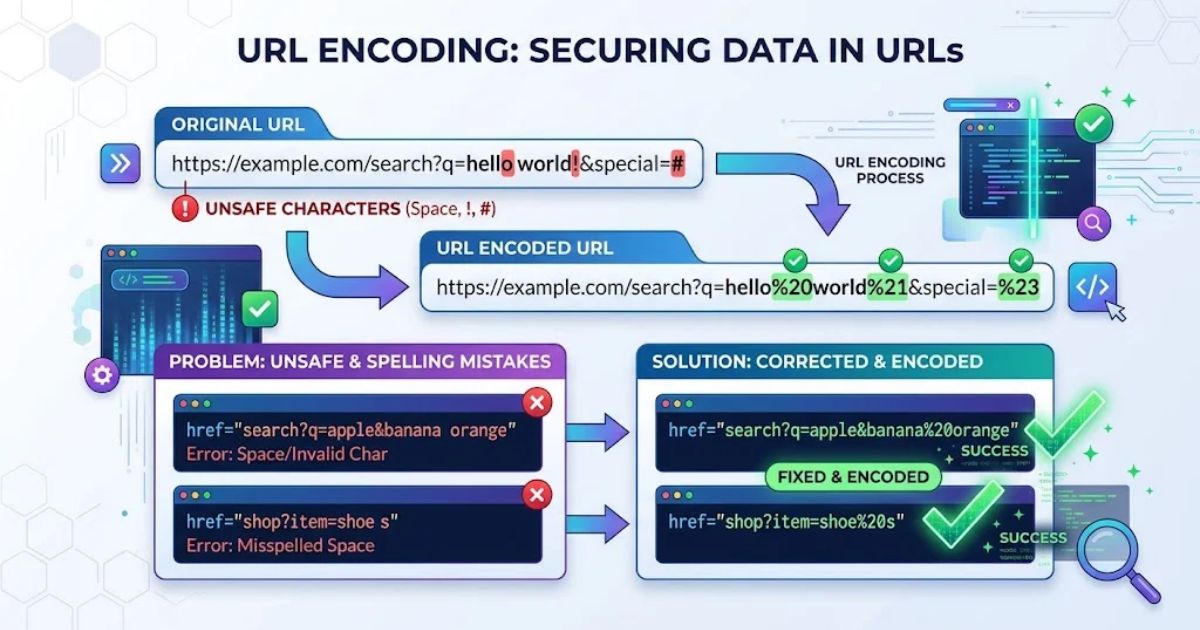
URL encoder spell mistake problems can cause broken links, incorrect URL parameters, and unexpected errors in web applications. URL encoding converts special characters into a format that browsers and servers can process correctly. However, incorrect encoding, double encoding, or spelling mistakes in encoding functions can lead to technical issues. Understanding these problems helps developers, website owners, and SEO professionals maintain clean, functional URLs.
In this guide, we will explore the common causes of URL encoding errors, practical solutions, and proven best practices. You will learn how to fix spaces in URLs, handle special characters, prevent UTF-8 issues, and avoid double encoding. We will also explain how proper URL encoding, secure URL construction, and effective troubleshooting can improve website functionality and support better SEO performance.
What Is a URL Encoder Spell Mistake?
A URL encoder spell mistake is any typo or character error that happens while encoding, decoding, or writing a URL. It covers more than misspelled words.
It usually falls into one of four groups:
- Broken percent codes, such as %2G instead of %2F
- Misspelled code, such as encodeURIComponet() instead of encodeURIComponent()
- Misspelled content, where a typo is faithfully encoded and sent
- Wrong encoding choices, such as encoding twice or skipping a reserved character
The browser or server will not guess what you meant. It reads the URL exactly as written.
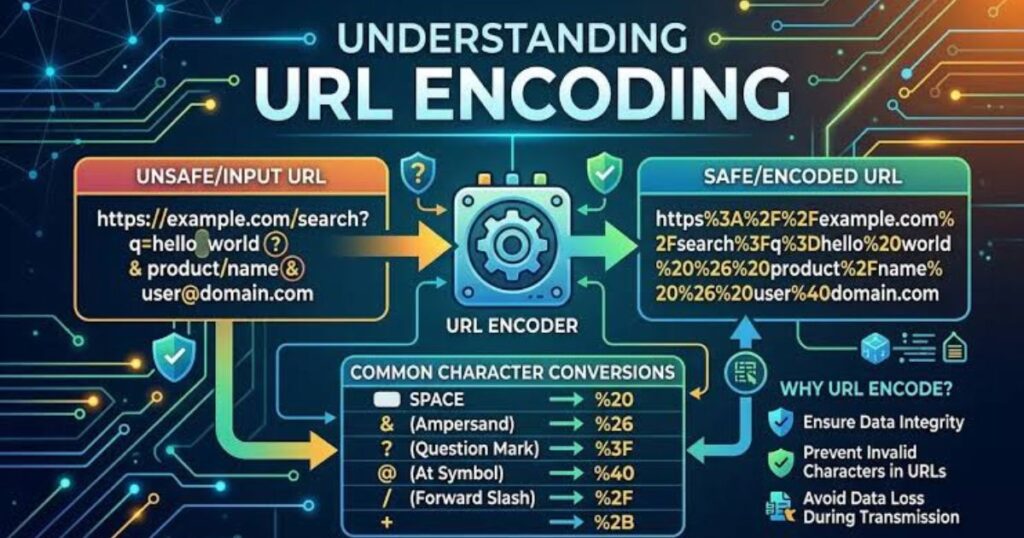
How URL Encoding (Percent Encoding) Works
A Uniform Resource Locator (URL) can safely carry only a limited set of ASCII characters. Anything else is converted to percent-encoded characters: a % followed by two hexadecimal digits.
Characters outside ASCII are first converted to UTF-8 bytes. Each byte is then percent-encoded.
| Character | Encoded Form | Notes |
| Space | %20 | Also + in form data |
| ! | %21 | Reserved |
| # | %23 | Starts a fragment |
| % | %25 | Must be encoded first |
| & | %26 | Separates query parameters |
| + | %2B | Means a space in form data |
| / | %2F | Path separator |
| : | %3A | Reserved |
| = | %3D | Separates key and value |
| ? | %3F | Starts the query string |
| @ | %40 | Reserved |
Unreserved characters (A–Z, a–z, 0–9, -, _, ., ~) never need encoding.
Read More: unbanned g+
Common URL Encoder Spell Mistake Problems
Most URL encoding problems come from a small set of causes. Spotting the pattern saves hours of debugging.
| Mistake Type | Example | Result |
| Invalid hex digit | %2G | Decoder error or literal text |
| Truncated code | %2 | Malformed URL |
| Function name typo | encodeURIComponet() | ReferenceError in JavaScript |
| Double encoding | %2520 | Shows %20 instead of a space |
| Raw & in a value | q=Tom & Jerry | Value cut off at & |
| Wrong character set | %E9 (Latin-1 é) | Invalid UTF-8 sequence |
Each of these is a URL formatting error. Each one fails in a different way.
URL Encoding Examples: Correct vs. Wrong
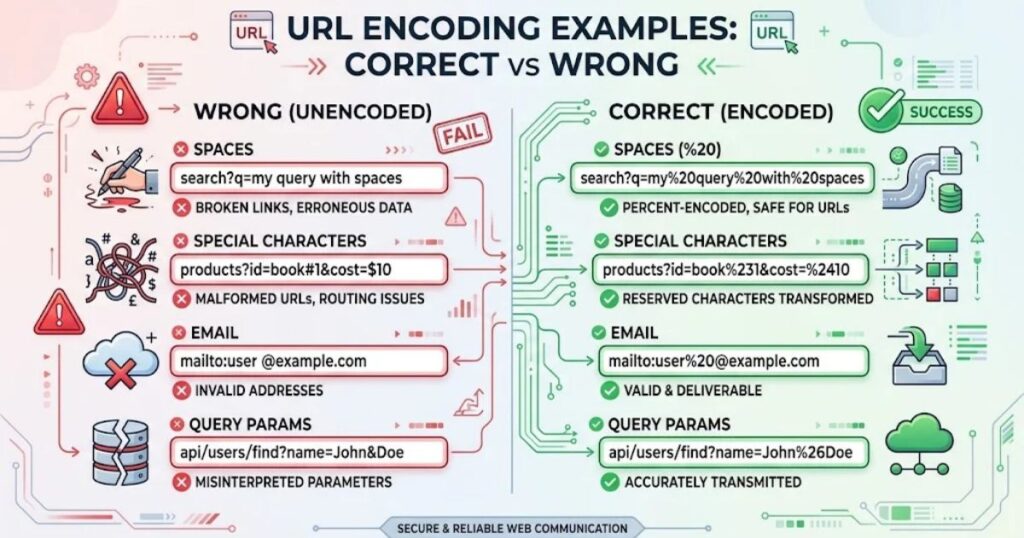
Seeing the difference side by side makes invalid URL characters easier to catch.
| Original Text | Correct Encoding | Common Mistake |
| hello world | hello%20world | hello world (raw space) |
| Tom & Jerry | Tom%20%26%20Jerry | Tom%20&%20Jerry |
| 50% off | 50%25%20off | 50% off |
| user@example.com | user%40example.com | user@example.com in a query value |
| café | caf%C3%A9 | caf%E9 |
| € | %E2%82%AC | %80 |
The % sign is the most overlooked. A bare % followed by non-hex characters makes the whole string malformed.
JavaScript vs. PHP: Which Function Should You Use?
The wrong function is a frequent cause of URL encoding issues. Each one has different rules.
| Function | Encodes Space As | Leaves Unencoded |
| encodeURIComponent() | %20 | A–Z a–z 0–9 – _ . ! ~ * ‘ ( ) |
| encodeURI() | %20 | Same set, plus ; , / ? : @ & = + $ # |
| PHP urlencode() | + | – _ . |
| PHP rawurlencode() | %20 | – _ . ~ |
Use encodeURIComponent() for individual parameter values. Use encodeURI() only for a complete URL that is already well formed.
javascript
const query = “Tom & Jerry”;
const url = “https://example.com/search?q=” + encodeURIComponent(query);
// https://example.com/search?q=Tom%20%26%20Jerry
Step-by-Step URL Troubleshooting
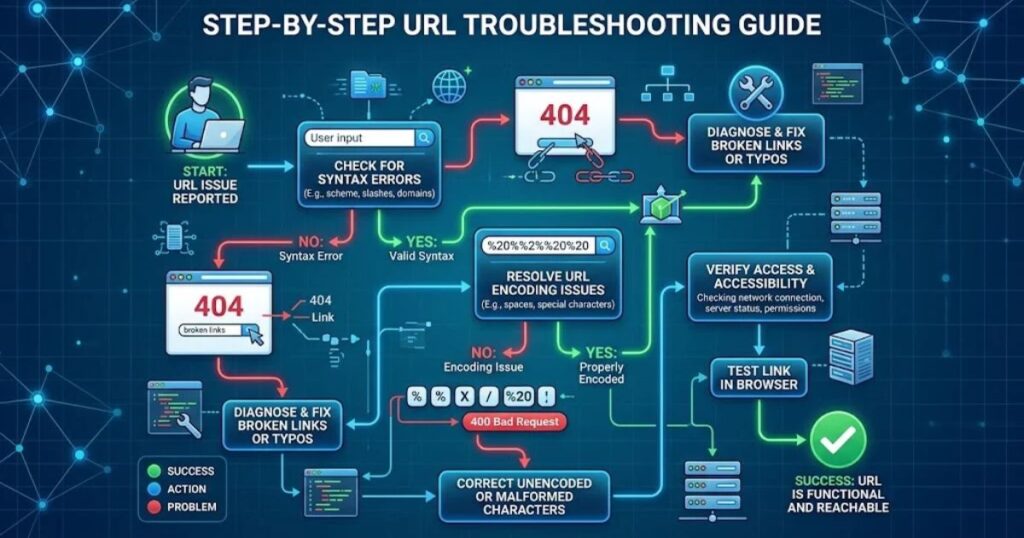
When a link fails, work through these steps in order.
- Read the raw URL. Look for spaces, bare % signs, and stray characters.
- Decode it once with a URL decoder. Check that the output is readable.
- Check for %25. If you see it, the URL was probably encoded twice.
- Confirm the character set. Modern systems expect UTF-8.
- Check the function spelling in your code.
- Re-encode only the parameter values, never the separators ?, &, and =.
This process solves most URL parsing errors in minutes.
Security and SEO Impact
Encoding errors are not just cosmetic. They affect web application security and search visibility.
- Security: Unencoded user input placed into a URL can enable injection or cross-site scripting if it is later reflected on a page. Encoding is one layer of defense. Output escaping for the target context is still required.
- SEO: Broken or inconsistent URLs can create duplicate pages or 404 errors. This hurts search engine crawling and weakens URL canonicalization.
- Consistency: %c3%a9 and %C3%A9 are equivalent by standard. Normalizing to uppercase hex avoids edge cases with caches and crawlers.
SEO-friendly URLs stay short and lowercase, and they avoid unnecessary special characters.
Final Thoughts on URL Encoder Spell Mistake Problems
Every URL encoder spell mistake comes down to one rule: the URL must say exactly what you mean, character for character. Tools can catch most errors, but only if you know what to look for.
The table below summarizes the most common scenarios and their outcomes.
| Scenario | What Happens | Fix |
| Typo in % code (%2G) | Decoder error or literal text | Correct to a valid hex pair |
| Misspelled function name | Script crashes | Fix spelling, use linting |
| Value encoded twice | %2520 appears in the page | Encode only once |
| Raw & inside a value | Parameter is cut off | Use %26 |
| Latin-1 bytes in a UTF-8 system | Garbled text or error | Re-encode as UTF-8 |
| Typo in the encoded text itself | Wrong search results or 404 | Proofread before encoding |
Real-Life Situations Where This Matters
- Search forms: A user searches “R&D budget.” Without encoding, the server receives only “R”.
- Email campaign links: A tracking URL with an unencoded + or space breaks the click-through.
- API requests: A misspelled parameter name returns empty data, and the request looks fine.
- Redirects and login flows: A double-encoded return URL sends users to the wrong page.
- Multilingual sites: Accented or non-Latin characters fail when systems disagree about the character set
Common Mistakes & Misconceptions
- Mistake: Encoding the entire URL, including https://.
Fix: Encode only parameter values with encodeURIComponent(). - Mistake: Assuming + and %20 always mean the same thing.
Fix: + means a space only in form-style query strings. Use %20 when unsure. - Mistake: Encoding data that was already encoded.
Fix: Decode first, inspect it, then encode once. - Mistake: Believing a typo will be auto-corrected.
Fix: Servers do not guess. Proofread before sending. - Mistake: Forgetting to encode % itself.
Fix: Always write %25 for a literal percent sign. - Mistake: Trusting that a link works because it opens in your browser.
Fix: Browsers silently repair some errors that servers and APIs reject. Test with real requests.
Why People Search “URL Encoder Spell Mistake”
The reader has a broken link or a failing request, and they want it fixed fast. Most arrive with one of these needs:
- To understand why an encoded URL shows odd symbols or fails
- To correct a typo inside an encoded string without redoing everything
- To confirm which function or setting is correct
- To find a quick tool that validates or repairs the link
The shortest path is to decode, inspect, correct the one faulty piece, and encode again.
Read More: expert games thelaptopadviser
Practical Tools, Shortcuts & Habits
Tools
- An online URL encoder and decoder to encode URL online or decode URL online
- Browser developer tools (Network tab) to view the exact request sent
- A URL validation tool or linter in your code editor to catch spelling errors
Shortcuts
- In the browser console, run decodeURIComponent(“your%20string”) for a quick check.
- Paste suspicious links into a decoder before editing them by hand.
Habits
- Build URLs with a URL library or URLSearchParams instead of string concatenation.
- Use autocomplete and spell-check in your editor.
- Test every link with special characters, spaces, and non-English text.
- Keep one encoding standard (UTF-8) across the whole stack.
FAQ’s
What is a URL encoder?
A URL encoder is a tool that converts unsafe characters in a web address into a safe format that browsers and servers can read correctly.
Why is URL encoding needed?
URLs can only contain a limited set of ASCII characters. Encoding makes sure spaces, symbols, and non-English letters don’t break the link.
What does %20 mean in a URL?
%20 is the encoded form of a space character. Browsers use it because spaces are not allowed in web addresses.
How do I decode a URL?
Paste the encoded link into a URL decoder and click Decode. The percent codes are turned back into readable characters.
What characters need to be URL encoded?
Spaces, quotes, and symbols like &, ?, #, %, +, and = should be encoded. Non-English and special characters also need encoding.
Conclusion
A URL encoder spell mistake can be a broken % code, a misspelled function, or a typo that gets encoded as written. In every case the fix is the same: decode, inspect, correct, and encode once.
Use encodeURIComponent() for values, stick to UTF-8, and test links before publishing. These habits prevent most URL encoding errors before users ever see them.
2 thoughts on “URL Encoder Spell Mistake Problems: Causes, Fixes & Best Practices”