

User Experience Basics refers to the fundamental principles of creating websites, apps, and digital products that are easy to use, helpful, and enjoyable. User experience, commonly known as UX, focuses on how people interact with a product and how easily they can achieve their goals. A good user experience includes simple navigation, clear content, fast loading speeds, accessible design, and a consistent layout. These elements help users find information quickly and enjoy a smoother digital experience.
In this guide, we will explore the key principles of user experience, its importance, and the benefits of effective UX design. You will learn how usability, accessibility, visual design, and user feedback influence the overall experience. Whether you are a website owner, blogger, designer, or business professional, understanding user experience basics can help you build better digital products, improve user satisfaction, and encourage visitors to return.
What Are User Experience Basics, Really?
User experience basics are the foundational ideas behind designing products around real human needs: usefulness, usability, clarity and trust.
UX is not decoration. It covers everything a person feels and does while using a website, app, device or service. That includes the first search, the checkout, the error message and the support email afterward.
A simple test: if users never have to ask “where do I click?”, the basics are working.
Where the Term “User Experience” Actually Came From
Don Norman, a cognitive scientist, popularized the term in the early 1990s while working at Apple.
He wanted a phrase broader than “interface” or “usability.” His point was that a product is more than its screen. It includes the hardware, the packaging, the support and the emotions involved.
Later, Jakob Nielsen’s 10 usability heuristics (1994) and Peter Morville’s User Experience Honeycomb gave designers practical frameworks. Both are still taught today.
UX vs. UI vs. CX: What’s the Real Difference?
UX covers the whole interaction, UI covers the visual interface, and CX covers the entire relationship with a brand.
| Term | Focus | Example |
| UX (User Experience) | How easy and useful a product feels | A clear signup flow |
| UI (User Interface) | Visual elements such as buttons, type and color | The button style and spacing |
| CX (Customer Experience) | Every brand touchpoint, online and offline | Ads, delivery, returns, support |
Think of a restaurant. UI is the menu design. UX is how smoothly you order and eat. CX is everything from booking the table to the follow-up email.
What Is User Experience Design?
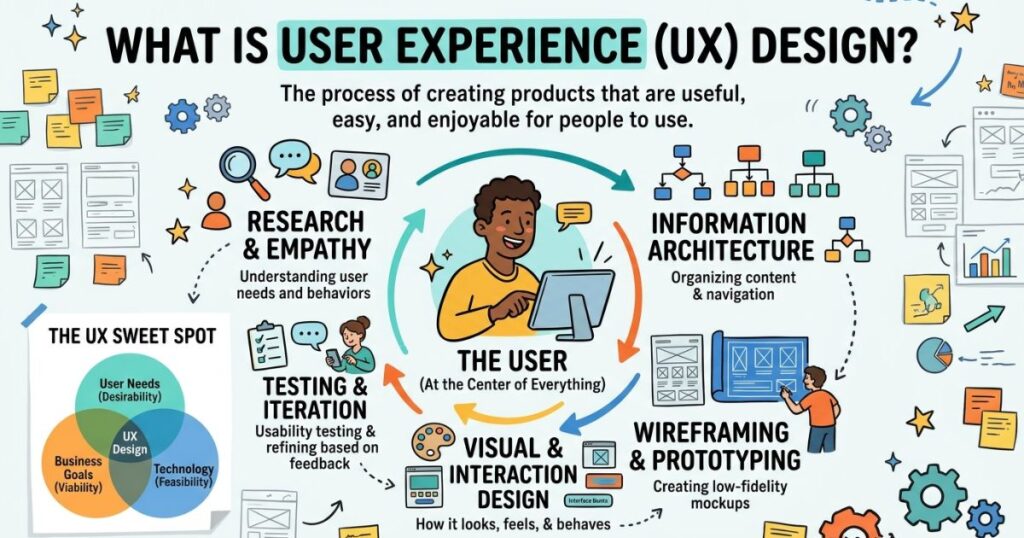
User experience design is the process of researching users, shaping flows and testing solutions so a product solves real problems with little friction.
UX designers typically do these tasks:
- Research users through interviews, surveys and analytics.
- Map user journeys and information architecture.
- Sketch wireframes and build prototypes.
- Run usability tests.
- Improve the product based on evidence.
It is a loop, not a straight line. Teams repeat it as products and users change.
Read More: instagram search query optimization
Why These Fundamentals Matter More in 2026
Users have more choices, less patience and higher expectations than ever, so small frustrations now cost real money.
Three shifts raise the stakes:
- AI-driven interfaces. Chatbots, assistants and generative features need clear controls, honest feedback and easy ways to undo actions.
- Accessibility rules. WCAG 2.2 and regional laws push teams to design for everyone, not just the average user.
- Performance signals. Google’s Core Web Vitals (loading, interactivity and visual stability) tie speed directly to search visibility.
Tools change quickly. The basics stay stable, which is why they are worth learning first.
UX Basics for Beginners: The Core Building Blocks
Beginners should master seven things: user research, usability, information architecture, visual hierarchy, accessibility, feedback and testing.
1. User Research
Talk to real people. Assumptions are the most common cause of weak design.
2. Usability
Can users complete a task quickly and without errors? Nielsen’s heuristics help here, including visibility of system status, error prevention and consistency.
3. Information Architecture
Organize content so people find things fast. Clear labels and logical menus beat clever ones.
4. Visual Hierarchy
Size, contrast and spacing tell users what matters most. One primary action per screen is a good rule.
5. Accessibility
Use sufficient color contrast, readable text, keyboard navigation and alt text. Accessible design usually improves the experience for everyone.
6. Feedback and Microcopy
Buttons, confirmations and error messages should say what happened and what to do next. “Something went wrong” helps nobody.
7. Testing and Iteration
Release, observe, learn and refine. Nielsen’s research suggests that testing with about five users uncovers most major usability problems in a single round.
Peter Morville’s Honeycomb adds a useful checklist. A good product is useful, usable, findable, credible, desirable, accessible and valuable.
Real-World Examples of Basics Done Right (and Wrong)
Good UX feels invisible. Bad UX makes users stop and wonder.
Done right
- Google Search: one box, one purpose, fast results. Nothing competes for attention.
- Amazon one-click and saved carts: fewer steps between intent and purchase.
- Airline apps with clear boarding pass screens: the key information appears when travelers need it most.
Done wrong
- Forced account creation before checkout: this is a well-known cause of abandoned carts. Baymard Institute research puts average cart abandonment near 70 percent, with required accounts and complicated checkout among the reasons.
- Cookie banners with confusing choices: users click randomly just to get past them.
- Forms that erase everything after one error: a small bug that causes big frustration.
You can run the same check on your own site in ten minutes. Try to complete the main task as a first-time visitor on a phone.
UX Designer Salary

In the US, most 2026 sources put the average UX designer salary between roughly $95,000 and $119,000, with senior roles earning far more.
Figures differ by source and method. One aggregator listed an average of $94,800, while Coursera’s guide, using Glassdoor data, listed $109,000 for UX designers and $119,000 for UX researchers. Total compensation including bonuses and equity can reach $149,000 or more.
What moves the number:
- Experience: senior and principal roles can pay roughly double entry-level roles.
- Location and industry: big tech hubs and fintech tend to pay more.
- Specialization: UX research, product design and UX engineering often earn more than generalist roles.
- Tools and skills: strong Figma, research and data skills help.
Outside the US, pay is lower in absolute terms. One estimate puts India at about $33,300 per year. Always check current local listings before negotiating.
Common Myths About User Experience Basics
Most UX myths come from confusing UX with visual design.
- Myth: UX is just making things pretty. Reality: it is about solving problems. Attractive but confusing products fail.
- Myth: UX and UI are the same. Reality: UI is one part of UX.
- Myth: Good UX is expensive. Reality: fixing problems after launch costs far more than testing early.
- Myth: You need to be a designer to care. Reality: developers, marketers and founders all shape the experience.
- Myth: Users will figure it out. Reality: most will simply leave.
- Myth: UX is finished at launch. Reality: user needs keep changing.
The Basics of User Experience Design PDF
A PDF is useful as a quick-reference checklist, but a printed list cannot replace testing with real users.
If you want a downloadable guide, look for one that covers the 10 heuristics, the Honeycomb, a journey map template and a usability test script. Check the publication date. Anything written before WCAG 2.2 (2023) may miss current accessibility standards. Prefer PDFs from established sources such as Nielsen Norman Group, universities or recognized course providers.
Pros and Cons of Prioritizing UX Fundamentals
Pros
- Higher conversion and task completion rates
- Fewer support requests and returns
- Stronger trust and brand loyalty
- Lower rework costs for development teams
- Better accessibility and wider reach
Cons
- It takes time and some budget upfront
- Research can slow rushed launches
- Findings sometimes challenge internal opinions
- Results are not always instant or easy to attribute
- Over-testing small details can cause delays
For most teams, the benefits clearly outweigh the costs. The trick is to match the amount of research to the size of the decision.
What the Research Shows
Evidence consistently links better usability to better business results.
- Nielsen Norman Group’s long-running studies show that small, frequent tests find most serious issues early.
- Baymard Institute’s large-scale checkout research documents how form design and trust signals affect abandonment.
- Google’s Core Web Vitals work shows that slow, unstable pages frustrate users and hurt search performance.
- Often-cited industry claims, such as Forrester’s estimate of large returns on UX investment, should be read as directional rather than guaranteed.
The honest takeaway: UX is not magic, but ignoring it is expensive.
UI/UX Basics
UI/UX basics combine how a product works with how it looks. Start with structure and flow (UX), then apply visual style (UI).
A practical order of work:
- Define the user goal.
- Sketch the flow on paper.
- Build a low-fidelity wireframe.
- Test it with a few users.
- Add typography, color and spacing.
- Test again before launch.
Skipping straight to visuals is the most common beginner mistake.
Who Should Actually Care About This
Anyone who builds, sells or manages something people use should care about UX basics.
- Founders and product managers: better retention and fewer wasted features.
- Developers: fewer bug reports caused by confusing flows.
- Marketers: stronger conversion from the same traffic.
- Content writers and SEOs: engagement and readability affect performance.
- Students and career changers: a growing field with varied roles.
Read More: what is a query parameter
Getting Started: A Practical Path for Beginners
You can learn UX basics in a few months with a steady routine and one real project.
- Learn the vocabulary. Read about heuristics, personas, journeys and wireframes.
- Study the classics. Don Norman’s The Design of Everyday Things is a reliable starting point.
- Pick a tool. Figma has a free tier and is widely used.
- Redesign something small. Choose a local business site or a confusing form.
- Test with five people. Watch silently and take notes.
- Document your process. Hiring managers value your reasoning more than polished screens.
- Consider a structured course. The Google UX Design Certificate is a common entry route.
- Build a portfolio. Two or three well-explained case studies are enough to start.
How to Actually Measure User Experience Basics
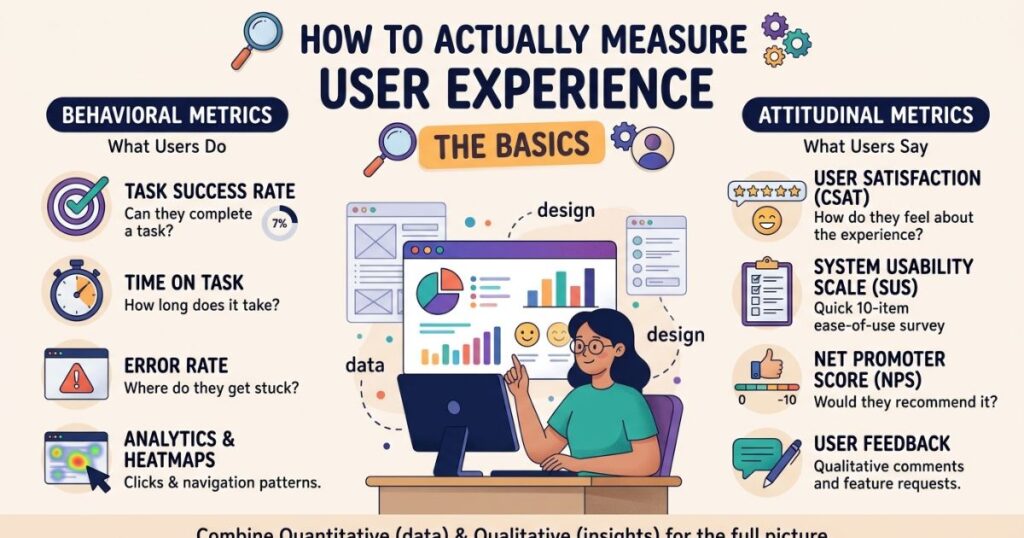
Measure UX with a mix of behavior data and user feedback.
Quantitative metrics
- Task success rate
- Time on task
- Error rate
- Conversion rate and drop-off points
- Core Web Vitals (LCP, INP, CLS)
Standard questionnaires
- SUS (System Usability Scale): a 10-question survey. A score around 68 is generally considered average.
- NPS and CSAT: broader satisfaction and loyalty indicators.
Qualitative methods
- Moderated usability tests
- Session recordings and heatmaps
- Open-ended interviews
Pick one or two metrics, record a baseline, change something and measure again. That cycle is the heart of UX work.
FAQs
What is user experience?
User experience (UX) is how a person feels when using a website, app, or product, including how easy, useful, and enjoyable it is to use.
What does UX stand for?
UX stands for user experience.
Why is user experience important?
Good UX keeps visitors engaged, increases conversions, builds trust, and reduces frustration and bounce rates.
What is the difference between UX and UI?
UX focuses on the overall experience and how a product works, while UI (user interface) focuses on how it looks, such as buttons, colors, and layout.
What are the basic principles of UX design?
The core principles are usability, simplicity, consistency, accessibility, clear navigation, and visual hierarchy.
Conclusion
User experience basics come down to one habit: understand people before you design for them. Learn the core principles, test early with real users and measure what changes. You do not need a big budget or a design degree to start.
Pick one page or flow you own today, run a five-person test this week and fix the biggest problem you find. That small step will teach you more than any checklist.
2 thoughts on “User Experience Basics: Principles, Benefits & Complete Guide”