
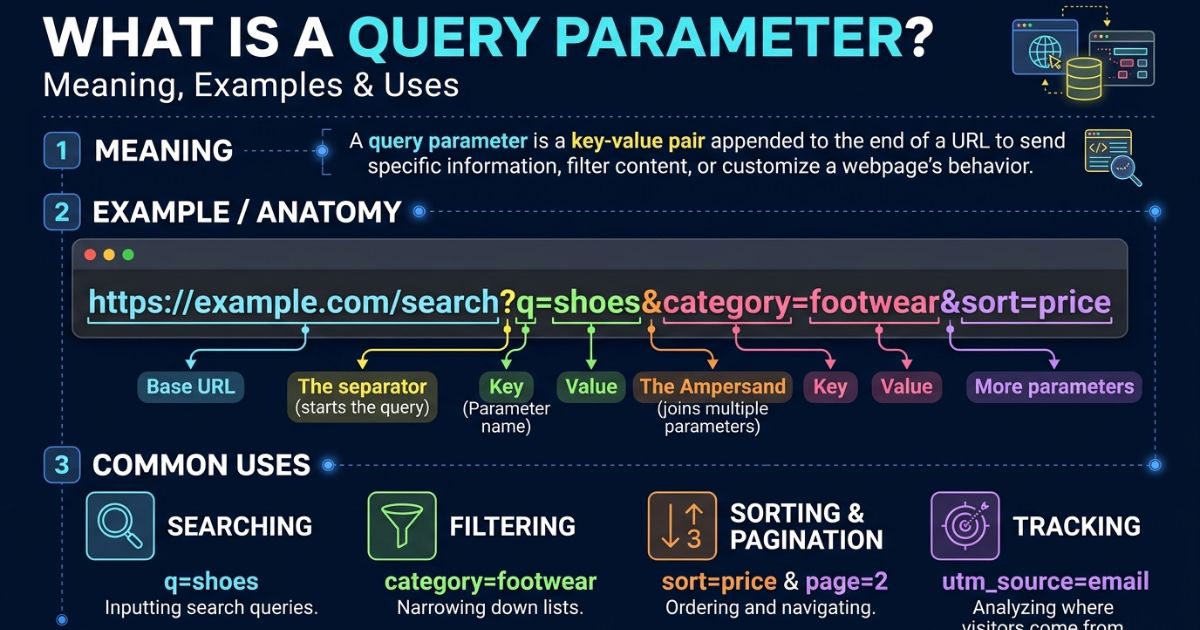
A query parameter is a piece of information added to a URL to help a website process a request or display specific content. It usually appears after a question mark (?) in a web address, with parameters separated by an ampersand (&). For example, in example.com/search?q=gaming, the parameter q=gaming tells the website what the user wants to search for. Query parameters are commonly used for search filters, product categories, tracking campaigns, pagination, and other website functions.
In this guide, we will explain what a query parameter is, how it works, and why it matters for websites and online applications. You will learn about common query parameter examples, the difference between query parameters and URL paths, and how developers use them to manage information. Whether you are a beginner, website owner, blogger, or developer, understanding query parameters can help you work with URLs more effectively and improve your knowledge of web technology.
What Is a Query Parameter, Exactly?
A query parameter is a key-value pair added to the end of a URL after a question mark (?). It passes extra information to a server without changing the base address of the page or endpoint.
Here is a simple example:
In this URL, color is the key and black is the value. The server reads the pair and returns only black shoes.
Query parameters are also called URL parameters or query variables. The group of all parameters in a URL is called the query string.
Quick definition for beginners: a query parameter is a labeled instruction attached to a web address that tells the server how to customize its response.
How Query Parameters Work Inside a URL
A URL has several parts. The query sits near the end, before the optional fragment (the # section).
Take this example:
It breaks down like this:
- Scheme: https
- Domain: example.com
- Path: /products
- Query string: category=laptops&sort=price&page=2
Inside the query string, three symbols do the work:
- ? starts the query string
- = connects a key to its value
- & separates one parameter from the next
When your browser sends this request, the server parses each pair and decides what to return. In this case, it sends laptops, sorted by price, on page two.
Read More: user experience basics
What Is a Query String?
A query string is the full text after the question mark. A query parameter is one key-value pair inside it. People often use the terms as if they mean the same thing, but one is the container and the other is the item.
URL Encoding Matters
Some characters have special meaning in URLs. Spaces, ampersands and non-English letters must be percent encoded, as defined in RFC 3986. For example, red shoes becomes red%20shoes (or red+shoes in form data).
If you skip encoding, the server may cut your value in the wrong place.
What Are Query Parameters in API Work?
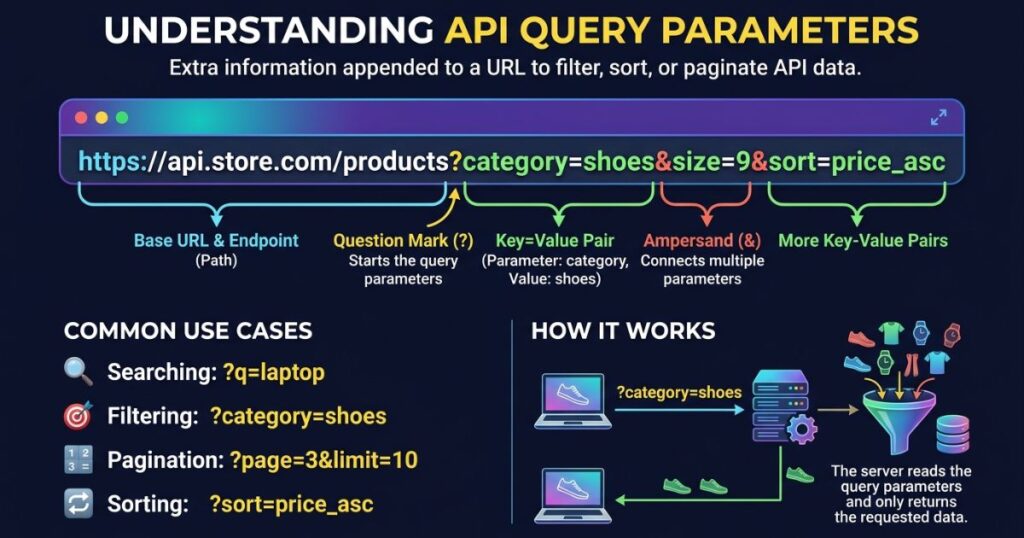
APIs use query parameters to fine-tune a request. The endpoint stays the same, and the parameters narrow down the result.
Here is a typical API call:
GET /api/orders?status=shipped&limit=20&offset=40
This one request asks for shipped orders, 20 at a time, skipping the first 40. Developers rely on this pattern for three main jobs:
- Filtering: status=shipped
- Sorting: sort=date_desc
- Pagination: limit=20&offset=40 or page=3
Good API documentation lists every supported parameter, its type and its default value. If your API has no such list, users will guess, and guesses cause errors.
What Is a Query Parameter in a REST API?
In REST, a resource is identified by its path, and the query refines how you view that resource. For example, /users/42 identifies one user, while /users?role=admin filters a collection.
Query parameters are generally used with GET requests, which are meant to read data, not change it. Using them to trigger destructive actions is a design mistake.
Query Parameters vs Path Parameters
This is where many beginners get stuck. Both pass data in a URL, but they play different roles.
| Feature | Query Parameter | Path Parameter |
| Position | After the ? | Inside the path |
| Example | /users?role=admin | /users/42 |
| Purpose | Filter, sort, search | Identify a specific resource |
| Required? | Usually optional | Usually required |
| Order matters? | No | Yes |
A simple rule: use a path parameter to say which resource you want. Use a query parameter to say how you want it shown.
Real-World Uses You Interact With Daily

You use query parameters far more often than you notice. Common examples include:
- Search engines: ?q=best+running+shoes carries your search term.
- E-commerce filters: ?size=10&brand=nike&price=under100 narrows a product list.
- Pagination: ?page=5 moves you through results.
- Campaign tracking: UTM parameters like utm_source=newsletter show marketers where a visit came from.
- Language and region: ?lang=fr switches the interface.
- Video timestamps: ?t=90 starts a video at 90 seconds.
- Login flows: a redirect parameter returns you to the page you were on.
- WordPress: the default permalink ?p=123 tells the site which post to load.
Each case follows the same logic. One page serves many variations, and the parameters decide which one you see.
What Is a Query Parameter in JavaScript?
In JavaScript, you read query parameters with the built-in URLSearchParams interface. It is supported by all modern browsers and Node.js.
Reading parameters:
javascript
const url = new URL(“https://example.com/shop?color=black&size=10”);
const color = url.searchParams.get(“color”); // “black”
const size = url.searchParams.get(“size”); // “10”
Building parameters safely:
javascript
const params = new URLSearchParams({ q: “red shoes”, page: 2 });
fetch(`/api/search?${params.toString()}`);
URLSearchParams handles encoding for you, so you avoid manual string concatenation. Remember that every value comes back as a string. Convert numbers and booleans yourself.
What Developers Should Know About Query Parameter Limits
The HTTP specification does not set a fixed maximum URL length. Real limits come from browsers, servers, proxies and CDNs.
Practical numbers to keep in mind:
- RFC 9110 recommends that systems support URLs of at least 8,000 octets.
- Many servers, including Apache by default, cap the request line at around 8,190 bytes.
- Older Internet Explorer versions stopped at 2,083 characters. This old figure still circulates, but it no longer applies to modern browsers.
- Search engines and link previews may truncate very long URLs.
Best practices:
- Keep URLs under roughly 2,000 characters for the widest compatibility.
- Do not send large payloads in the query. Use a POST request body instead.
- Avoid duplicate keys unless your server clearly supports arrays, such as tag=a&tag=b.
- Use lowercase, consistent key names.
Query Parameters and SEO
Parameters can create many URLs that show the same content. That wastes crawl budget and can dilute ranking signals.
To manage this:
- Add a canonical tag pointing to the clean version of the page.
- Block low-value filter combinations when appropriate.
- Link internally to clean URLs.
- Avoid putting session IDs in URLs.
Google retired its old URL Parameters tool in Search Console in 2022, so canonical tags and clean architecture now matter more than ever.
What Changed for Query Parameters in 2026
The role of the URL query has been shifting for several years, and 2026 is mostly about privacy and cleaner design. Here is where things stand. I could not verify any brand new 2026 specification changes, so these points reflect the established direction:
- Browsers strip tracking parameters. Firefox removes known tracking parameters in Enhanced Tracking Protection Strict mode, a feature introduced in Firefox 102. Brave has its own list-based filter.
- Tracking lists keep growing. Identifiers such as fbclid, gclid and mc_eid are common targets.
- Marketers are moving to first-party data. Relying only on URL tags is less dependable, so server-side tracking and consent-based analytics are growing.
- A dedicated QUERY method is under discussion. The IETF has been working on an HTTP QUERY method that would allow safe, read-only requests with a body. This helps when parameters are too long for a URL. Check the current status of the specification before building on it.
What the Research Shows
Mozilla’s engineering documentation explains why browsers act on this. Tracking IDs placed in a query string can follow a person across sites, in a way similar to third-party cookies. Mozilla also notes the hard part: telling real tracking IDs apart from legitimate parameters that make pages work.
That is why stripping uses allow lists and applies mainly to cross-site navigation. Stripping everything would break search pages, filters and login flows.
For developers, the lesson is simple. Never rely on a query parameter for anything essential to security or identity.
Building and Troubleshooting Your Own Query Parameters
Follow these steps to build clean, reliable query strings:
- Start with the base URL. Example: https://example.com/search
- Add ? and your first pair. Example: ?q=laptops
- Join more pairs with &. Example: &sort=price
- Encode special characters. Use encodeURIComponent() or URLSearchParams.
- Test the final URL in your browser and in a tool like Postman or curl.
Common problems and fixes:
- Value cut off: an unencoded & or # ended it early. Encode it.
- Parameter ignored: check the spelling and case. Many servers treat keys as case sensitive.
- Wrong data type: a number arrives as a string. Convert it.
- Duplicate results in search: add canonical tags.
- Link breaks when shared: the URL is too long, or a platform stripped part of it.
A habit worth building: log the raw query string on the server when debugging. It shows exactly what arrived.
Read More: sosoactive
What Is a Query Parameter Doing to Your Privacy?

Query parameters are visible. Anyone who sees the URL sees the data.
URLs are stored in browser history, server logs, analytics tools, proxies and sometimes in the Referer header sent to other sites. That is why sensitive details do not belong in them.
Never put these in a query string:
- Passwords
- API secrets or access tokens
- Personal data such as email addresses or ID numbers
- Payment details
What users can do:
- Turn on Enhanced Tracking Protection in Strict mode in Firefox.
- Use a browser with built-in tracking parameter filtering.
- Delete tracking tags such as utm_ and fbclid before sharing a link.
What site owners can do:
- Send sensitive data in headers or request bodies over HTTPS.
- Set a strict Referrer-Policy.
- Tell users plainly which tracking parameters you use.
FAQs
What is a query parameter?
A query parameter is a key-value pair added to the end of a URL after a question mark (?) that passes extra information to a web page or server.
What does a query parameter look like in a URL?
It looks like ?key=value, for example example.com/shoes?color=red. Multiple parameters are joined with an ampersand (&).
What is the difference between a query parameter and a path parameter?
A path parameter is part of the URL path (/users/123) and identifies a resource, while a query parameter comes after the ? and filters, sorts, or modifies the request.
How do you add query parameters to a URL?
Add a question mark at the end of the URL, then type the key, an equals sign, and the value. Separate extra parameters with an ampersand (&).
What is a query parameter used for?
Query parameters are used for searching, filtering, sorting, pagination, and tracking, such as UTM tags in marketing links.
Summary
A query parameter is a key-value pair added after the question mark in a URL. It lets one page or API endpoint return many different results, depending on what the user or app asks for.
Remember the essentials:
- Use ? to start, = to pair and & to separate.
- Choose path parameters for identity and query parameters for filtering, sorting and search.
- Encode special characters and keep URLs reasonably short.
- Use canonical tags to protect your SEO.
- Never place sensitive data in a URL.
1 thought on “What Is a Query Parameter? Meaning, Examples & Uses”